Adjustable Office Furniture: Key Features Worth Comparing

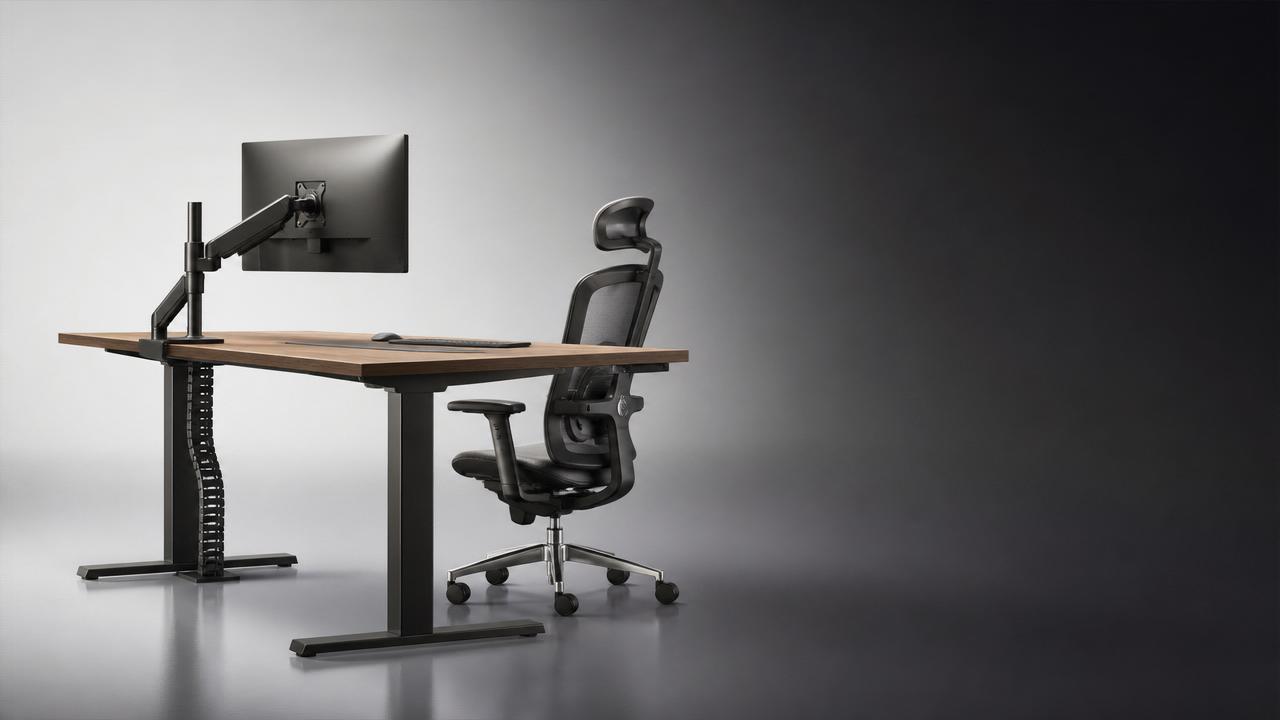
For technical evaluators, comparing adjustable office furniture starts with performance, not appearance. The best choices support posture, adapt to changing tasks, and remain stable through years of daily use.
In modern workplaces, adjustable office furniture also connects ergonomics, material science, workspace planning, and lifecycle value. A careful comparison reduces replacement costs and improves comfort across diverse office settings.
Why a structured comparison matters
Many products look similar in photos, yet differ sharply in lift quality, frame rigidity, cable management, and wear resistance. A structured review reveals the differences that affect long-term satisfaction.
This matters across the broader living and furnishing industry as well. GLC follows how aesthetics and craftsmanship meet industrial standards, especially in office and space architecture.
When evaluating adjustable office furniture, a checklist prevents decisions based only on branding or surface finishes. It also helps compare manual systems, electric models, and modular workstation solutions fairly.
Key features worth comparing in adjustable office furniture
- Check height range carefully. It should support seated and standing work for different body sizes without forcing awkward shoulder, wrist, or monitor positions during long work sessions.
- Review adjustment mechanism quality. Smooth, quiet movement with consistent speed and minimal wobble usually indicates better engineering, safer operation, and stronger internal components.
- Measure structural stability at maximum height. Some desks feel solid when lowered but shake during typing or monitor use once fully raised.
- Compare load capacity in real use. Consider monitors, docking stations, arms, desktop equipment, and daily movement instead of relying only on a headline weight number.
- Assess material durability. Steel frame thickness, desktop substrate density, edge sealing, and coating quality strongly influence lifespan and resistance to scratches or moisture.
- Inspect ergonomics beyond height. Keyboard depth, leg clearance, edge profile, and compatibility with task chairs all affect whether adjustable office furniture truly supports healthy posture.
- Evaluate noise output for shared spaces. Quiet motors and dampened movement are important in open-plan environments, meeting rooms, and hybrid work zones.
- Look at control options. Memory presets, anti-collision sensors, and lock functions improve usability, especially where several people share one workstation.
- Check cable management design. Built-in trays, grommets, and routing channels keep power and data lines protected during movement and maintain a cleaner workspace.
- Review modularity and accessories. Monitor arms, privacy panels, storage units, and power modules should integrate cleanly without weakening the desk structure.
- Confirm assembly complexity and maintenance needs. Faster installation and easier servicing reduce downtime and support long-term furniture management.
- Examine certification and safety compliance. Electrical approvals, material emissions standards, and durability testing provide stronger evidence than marketing claims alone.
Ergonomics and user adaptability
Ergonomics should be the first filter when comparing adjustable office furniture. A broad height range means little if monitor placement, elbow angle, and legroom remain poorly supported.
Look for designs that work with chairs, monitor arms, and footrests. The workstation should support movement through the day, not just occasional standing.
Stability and engineering quality
Stability often separates premium adjustable office furniture from lower-grade alternatives. Frame geometry, cross-support design, foot dimensions, and motor synchronization all influence wobble control.
If possible, compare typing stability, side-to-side motion, and front-to-back sway at several heights. These practical tests reveal more than specification sheets.
Materials, finish, and lifecycle value
Durability comes from details. Powder coating quality, weld consistency, laminate bonding, and edge protection directly affect whether adjustable office furniture maintains appearance under repeated use.
Lifecycle value also includes repairability. Some systems allow easy replacement of control boxes, handsets, or columns, extending service life and reducing total ownership cost.
In some reviews, limited-reference items such as 无 may appear. Treat such mentions as placeholders, not evidence of proven product performance.
How feature priorities change by application
Open-plan offices
In open spaces, noise and visual order matter more. Prioritize quiet motors, anti-collision protection, shared-user presets, and integrated cable management.
Also check footprint efficiency. Adjustable office furniture should support movement without disrupting adjacent desks or circulation paths.
Executive and client-facing spaces
Here, finish quality and refined movement become more important. Surface consistency, hidden hardware, and premium edge detailing should match ergonomic performance.
Aesthetic quality should never hide weak engineering. The best adjustable office furniture balances visual presence with dependable daily operation.
Home office and hybrid setups
For hybrid work, compact dimensions and easy assembly often matter most. Users may need a desk that fits smaller rooms while still supporting proper posture.
Power access, cable routing, and low operating noise are especially useful in residential environments where work and living zones overlap.
Collaborative and flexible work areas
Shared spaces benefit from intuitive controls and durable surfaces. Frequent adjustment increases wear, so component quality becomes even more critical.
Mobility features may help, but only if locking systems remain secure. Rolling bases should not compromise stability during active use.
Commonly overlooked issues and risks
A wide height range can mislead if the desk becomes unstable near its top setting. Always connect range claims with real stability testing.
Weight ratings may exclude dynamic loads. Monitor arms and uneven equipment placement can change stress patterns across the frame.
Control systems are often ignored during selection. Yet handsets, sensors, and electronics strongly affect reliability and user experience over time.
Surface materials may appear durable but fail at edges or corners first. Examine impact zones, seams, and moisture-sensitive points closely.
Warranty terms also need careful reading. Coverage on motors, electronics, desktops, and finish layers may differ significantly.
Practical comparison steps before selection
- Create a weighted scorecard covering ergonomics, stability, material quality, smart features, maintenance, and total cost rather than comparing only purchase price.
- Test furniture at minimum, mid, and maximum height with real equipment installed, including monitors, accessories, and active typing conditions.
- Request technical data on frame steel, desktop construction, motor cycles, certifications, and replacement part availability before final evaluation.
- Review how adjustable office furniture integrates with chairs, lighting, acoustic screens, and workplace power planning for a complete workspace assessment.
- Document user comfort after repeated transitions between sitting and standing, because short demonstrations rarely show full operational quality.
For broader industry observation, GLC highlights how office systems increasingly combine ergonomic science, aesthetic value, and manufacturing precision. Even a reference like 无 should be judged by the same standards.
Final takeaways for better decisions
The best adjustable office furniture is not simply the one with the most features. It is the option that delivers stable movement, ergonomic support, durable materials, and practical integration.
Start with user fit, then verify structure, materials, controls, and serviceability. This order helps separate meaningful performance from superficial design appeal.
Use a consistent checklist, test under realistic conditions, and compare total lifecycle value. That approach leads to adjustable office furniture choices that remain useful, comfortable, and efficient over time.